- Home
- Catalogues
- List of Supervising Constructions for High School - High School 2025-2026
- Catalogue of Science and Technology Aids 2025-2026
- Design & Technology Catalogue Primary Schools 2024-2025
- Catalogue of Science and Technology Aids 2024-25
- Catalogue of Science and Technology Aids 2023-24
- Christmas Crafts Set
- Nursery Schools Catalogue 2022-2023
- Nursery Schools Catalogue 2020-2021
- Nursery Schools Catalogue 2018-2019
- Happy and Creative Hands
- Jobs Category
- About us
- FAQ
- Terms and conditions of use
- Privacy Policy
- Cookies Policy
- Payment Methods
- Shipping Methods
- Returns Policy
- Payment Response
- Registration Successful
- Shipments to Greece
- New Service Point
- Teacher Registration
- Box Now Shipping Service
- 40 years Antoniadis
- Catalogues
- Catalogues
- About us
- Payment Methods
-
Educational Products
-
School Equipment
- All
- Write 'N' Wipe Boards
- White Magnetic Boards
- Board Erasers & Cleaners
- Interactive Boards
- Cork Boards
- Boards Paper Roll
- Talking Points
- Measuring Instruments
- Rotary Trimmer & Guillotine Machines
- Binding Machines
- Laminators
- Maps
- Literacy
- Time
- Presenters
- Music Instruments
- Batteries
- USB Memory Sticks
- Pocket Charts
- Various
-
Stationery
-
STEM - Robotics - Programming
-
Electronics
-
Educational Toys & Construction Kits
- All
- Mechanics
- Robotics
- Coding
- Simple Circuit Kits
- Science
- Green Science
- Planets
- Dinosaurs - Volcanos
- Animals
- Lenses
- Logic / Understanding
- Card & Board Games
- Rubik's Cubes
- Puzzles
- Magnetic Boards
- Hama Beads
- Painting Sets
- Craft Sets
- Creative Hands
- Soft Play Dough
- Fridge Magnets
- Wooden toys
- Baby Toys
- Gadgets
- Construction "Antoniadis"
- Seasonal
- Birthday Gifts
- Gift Vouchers
-
Tools & Adhesives
-
Craft Materials
- All
- Resin Art, Casting & Sculpting
- Decoupage & Mixed Media
- Items for Decoration
- Model Making & Mockup Supplies
- Creation Materials
- Decoratives
- Paints - Colours
- Mediums & Auxiliaries
- Canvases & Canvas Panels
- Clocks & Accessories
- Cards & Papers
- Fabrics
- Scrapbooking - Papers
- Powertex
- Quilling
- Seasonal
- All
- Acrylics
- Metallic - Pearl
- Chalk Paints
- Oil Paints
- Watercolours - Temperas
- Glass paints
- Fabric Paints
- Pouring Paint Sets
- Face painting
- Lasur Paints
- Chalkboard
- Pencils
- Chalks
- Markers
- Pastel-Crayons
- Outliners
- Alcohol Inks
- Spray
- Pigments for Liquid Glass
- Pigments
- Coloring Books
- Painting by numbers
- Paint Palettes and Containers
-
Art Supplies
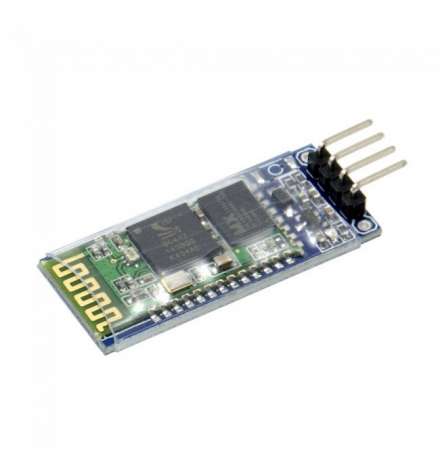
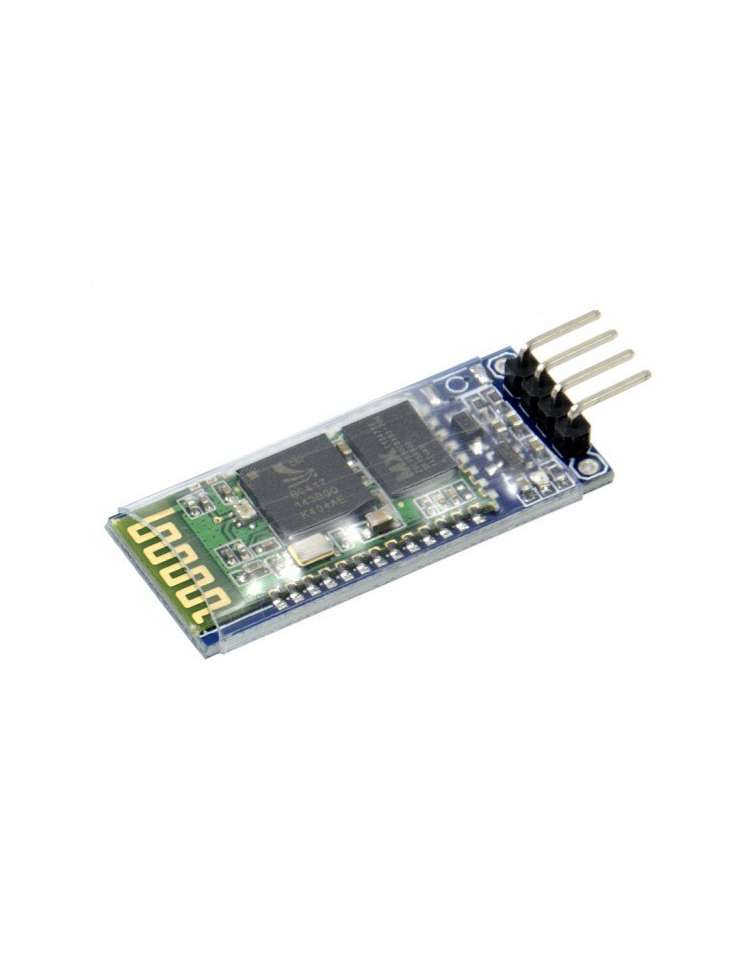
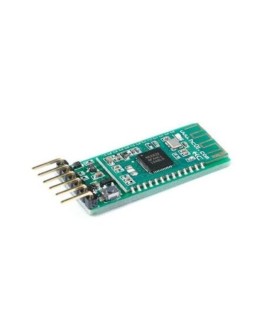
Bluetooth Transceiver RF MasterModule for Arduino - HC-06
The HC-06 Bluetooth Serial Module (MPN: HC-06) is a compact wireless transceiver that replaces a wired TTL serial connection with a transparent Bluetooth link. Operating on 3.6–5.5V with a TTL-level UART interface, it allows any microcontroller, Arduino board, or PC to communicate wirelessly without changing existing serial code — simply swap the wire for radio.
Key Features
- Transparent TTL Serial Transfer: Acts as a virtual serial cable between two devices → no firmware changes needed on either side
- Wide Supply Voltage (3.6–5.5V): Compatible with both 5V Arduino logic and 3.3V systems → versatile across platforms
- Default Baud Rate 9600, 8N1: Works out-of-the-box with most microcontroller UART peripherals → zero configuration for standard projects
- Built-in Antenna: No external antenna required → minimal footprint and easy enclosure
- Up to 30ft (≈9m) Range: Sufficient for bench, classroom, or room-scale wireless projects → practical cable-free reach
- Works with Any USB Bluetooth Adapter: Connect directly from a PC or laptop → no dedicated hardware needed on the host side
- Mini Size (4.4 × 1.6 × 0.7 cm): Fits on breadboards and inside compact enclosures → space-saving integration
Pinout & Wiring
| PIN | Symbol | Description |
|---|---|---|
| 1 | VCC | Power supply 3.6–5.5V |
| 2 | GND | Ground |
| 3 | TXD | UART Transmit — connect to MCU RX |
| 4 | RXD | UART Receive — connect to MCU TX |
Wiring note: Connect HC-06 TXD → Arduino RX, HC-06 RXD → Arduino TX. When using a 5V Arduino, the RXD pin is generally tolerant, but a voltage divider (1kΩ/2kΩ) on the RXD line is recommended for long-term protection.
Compatibility
- Arduino UNO / Nano / Mega: Direct 5V supply compatible; use SoftwareSerial on digital pins to keep the hardware UART free for debugging.
- ESP32 / ESP8266 (3.3V): Supply with 3.3V–3.6V; TXD output may need a level shifter to protect 3.3V RX pins.
- Raspberry Pi (3.3V logic): Use a level shifter on the RXD line; power from 3.3V or 5V pin.
- PC / Laptop: Pair via any USB Bluetooth dongle or built-in Bluetooth adapter; appears as a standard COM/serial port.
Typical Applications
- Wireless sensor data logging: Stream Arduino sensor readings to a PC or smartphone without USB cables — perfect for remote or moving setups.
- RC robot & vehicle control: Replace the tethered serial link with Bluetooth for real-time wireless motor commands from a phone app.
- GPS data relay: Bridge a GPS module's UART output to a PC wirelessly for mapping or tracking applications.
- Classroom & lab projects: Students can program and monitor Arduino sketches over Bluetooth, freeing the USB port for power only.
- Home automation nodes: Integrate with embedded projects that need simple point-to-point wireless serial without Wi-Fi complexity.
Technical Specifications
| Parameter | Value |
|---|---|
| Interface | UART TTL (Serial) |
| Wireless Protocol | Bluetooth (Serial SPP) |
| Supply Voltage | 3.6 – 5.5V |
| Default Baud Rate | 9600 bps, 8 data bits, 1 stop bit, no parity |
| Range | Up to 30ft (~9m) |
| Antenna | Built-in |
| Dimensions | 44 × 16 × 7 mm (1.73 × 0.63 × 0.28 in) |
| Weight | 7g (0.25oz) |
| MPN | HC-06 |
FAQ
Q: What is the difference between HC-05 and HC-06?
A: The HC-06 operates in Slave mode only — it waits for an incoming Bluetooth connection. The HC-05 supports both Master and Slave modes. For most Arduino-to-PC or Arduino-to-phone projects, the HC-06 Slave mode is all you need.
Q: Can I change the baud rate or device name?
A: Yes. While unpaired, send AT commands via serial (e.g., AT+BAUD4 for 9600, AT+NAMEMyDevice) to configure the module. No special programmer is required — use the same UART connection.
⚠ Note: Ensure the RXD pin receives no more than the module's rated voltage. When using with 5V Arduino, a simple resistor divider on the RXD line is recommended to avoid long-term pin stress. Keep within the 30ft range for reliable data transfer.