- Home
- Catalogues
- List of Supervising Constructions for High School - High School 2025-2026
- Catalogue of Science and Technology Aids 2025-2026
- Design & Technology Catalogue Primary Schools 2024-2025
- Catalogue of Science and Technology Aids 2024-25
- Catalogue of Science and Technology Aids 2023-24
- Christmas Crafts Set
- Nursery Schools Catalogue 2022-2023
- Nursery Schools Catalogue 2020-2021
- Nursery Schools Catalogue 2018-2019
- Happy and Creative Hands
- Jobs Category
- About us
- FAQ
- Terms and conditions of use
- Privacy Policy
- Cookies Policy
- Payment Methods
- Shipping Methods
- Returns Policy
- Payment Response
- Registration Successful
- Shipments to Greece
- New Service Point
- Teacher Registration
- Box Now Shipping Service
- 40 years Antoniadis
- Catalogues
- Catalogues
- About us
- Payment Methods
-
Educational Products
-
School Equipment
- All
- Write 'N' Wipe Boards
- White Magnetic Boards
- Board Erasers & Cleaners
- Interactive Boards
- Cork Boards
- Boards Paper Roll
- Talking Points
- Measuring Instruments
- Rotary Trimmer & Guillotine Machines
- Binding Machines
- Laminators
- Maps
- Literacy
- Time
- Presenters
- Music Instruments
- Batteries
- USB Memory Sticks
- Pocket Charts
- Various
-
Stationery
-
STEM - Robotics - Programming
-
Electronics
-
Educational Toys & Construction Kits
- All
- Mechanics
- Robotics
- Coding
- Simple Circuit Kits
- Science
- Green Science
- Planets
- Dinosaurs - Volcanos
- Animals
- Lenses
- Logic / Understanding
- Card & Board Games
- Rubik's Cubes
- Puzzles
- Magnetic Boards
- Hama Beads
- Painting Sets
- Craft Sets
- Creative Hands
- Soft Play Dough
- Fridge Magnets
- Wooden toys
- Baby Toys
- Gadgets
- Construction "Antoniadis"
- Seasonal
- Birthday Gifts
- Gift Vouchers
-
Tools & Adhesives
-
Craft Materials
- All
- Resin Art, Casting & Sculpting
- Decoupage & Mixed Media
- Items for Decoration
- Model Making & Mockup Supplies
- Creation Materials
- Decoratives
- Paints - Colours
- Mediums & Auxiliaries
- Canvases & Canvas Panels
- Clocks & Accessories
- Cards & Papers
- Fabrics
- Scrapbooking - Papers
- Powertex
- Quilling
- Seasonal
- All
- Acrylics
- Metallic - Pearl
- Chalk Paints
- Oil Paints
- Watercolours - Temperas
- Glass paints
- Fabric Paints
- Pouring Paint Sets
- Face painting
- Lasur Paints
- Chalkboard
- Pencils
- Chalks
- Markers
- Pastel-Crayons
- Outliners
- Alcohol Inks
- Spray
- Pigments for Liquid Glass
- Pigments
- Coloring Books
- Painting by numbers
- Paint Palettes and Containers
-
Art Supplies
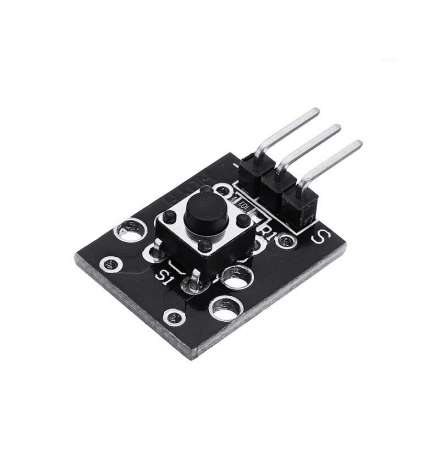
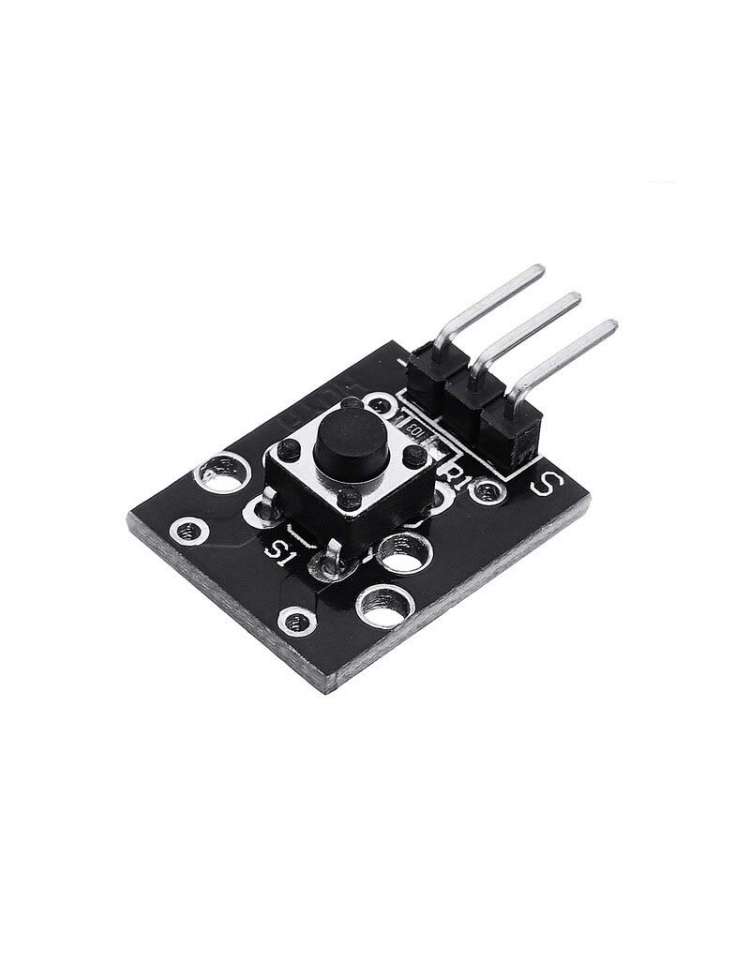
Button Key Switch Sensor Module KY-004
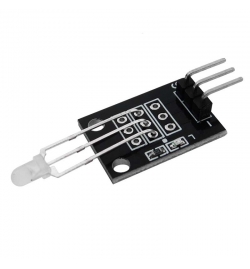
The KY-004 Button Key Switch Sensor Module (MPN: KY-004) is a simple, reliable digital input module designed for detecting momentary button presses in microcontroller-based projects. When the push-button is pressed, it closes an internal circuit and outputs a digital signal on the signal pin — no special communication protocol required, just a standard GPIO digital input. Rated at 50 mA / 12 V DC and built to last up to 100,000 electrical cycles, it is a staple component found in most 37-in-1 Arduino sensor kits.
Key Features
- Digital Output: Outputs HIGH or LOW on a single signal pin → plug-and-play with any GPIO-capable microcontroller
- Wide Operating Voltage (3.3 V–5 V): Compatible with both 5 V Arduino boards and 3.3 V ESP32/Raspberry Pi systems → no level-shifting needed in most cases
- 3-Pin 2.54 mm Header: Standard pitch connector → fits directly on breadboards and jumper wires
- 100,000-Cycle Electrical Life: Industrial-grade button endurance → reliable for long-term prototyping and production
- Wide Temperature Range (−25 °C to +105 °C): Suitable for both indoor and demanding environmental conditions → stable performance across scenarios
- Contact Resistance ≤ 50 mΩ: Very low resistance at contact closure → clean, consistent signal readings
Pinout & Wiring
| Pin | Symbol | Description |
|---|---|---|
| 1 | S | Digital Signal output — HIGH or LOW depending on button state |
| 2 | VCC | Power supply — connect to 3.3 V or 5 V |
| 3 | GND | Ground — connect to GND on your microcontroller |
Wiring note: Connect S to a digital input pin on your microcontroller, VCC to 3.3 V or 5 V, and GND to ground. Read the signal pin in your sketch: in the most common (pull-down) variant the pin reads LOW at rest and HIGH when pressed. Some variants (pull-up wiring) behave inversely — test with a simple digitalRead() sketch to confirm.
Compatibility
- Arduino UNO / Nano / Mega (5 V): Connect VCC to 5 V and S to any digital pin. Use
digitalRead()to detect button state. - ESP32 / ESP8266 (3.3 V): Connect VCC to 3.3 V. The 3.3 V-compatible output makes it safe for direct GPIO connection.
- Raspberry Pi (3.3 V GPIO): Connect VCC to 3.3 V pin; read state via GPIO library (e.g., RPi.GPIO or gpiozero).
Typical Applications
- User input interfaces: Add a physical button to trigger actions in your Arduino or ESP32 sketch — start/stop a motor, toggle an LED, or cycle through menu options.
- Interrupt-driven event detection: Wire the signal pin to an interrupt-capable GPIO to wake a sleeping microcontroller on button press.
- Game controllers & HID devices: Build custom game buttons or keyboard keys using a microcontroller with USB HID support.
- Reset or mode-select buttons: Use as a hardware reset or configuration button in embedded systems and IoT devices.
- Educational prototyping: Ideal for teaching digital input concepts — debouncing, pull-up/pull-down resistors, and state-machine logic.
Technical Specifications
| Interface | Digital GPIO (no protocol) |
| Operating Voltage | 3.3 V – 5 V |
| Rating | 50 mA / 12 V DC |
| Contact Resistance | ≤ 50 mΩ (initial) |
| Insulation Resistance | ≥ 100 MΩ (DC 250 V) |
| Dielectric Strength | AC 250 V, 50/60 Hz for 1 minute |
| Electrical Life | 100,000 cycles |
| Operating Force | 180 / 230 (±20 gf) |
| Operating Temperature | −25 °C to +105 °C |
| Soldering Temperature | 250 °C – 280 °C |
| Connector Pitch | 2.54 mm (3-pin header) |
| MPN | KY-004 |
FAQ
Q: Does the KY-004 output HIGH or LOW when the button is pressed?
A: In the most common pull-down variant the signal pin is LOW at rest and goes HIGH when pressed. Some modules use pull-up wiring and behave inversely. Verify with a simple digitalRead() test in your code.
Q: Do I need an external resistor with the KY-004?
A: No — the module includes an on-board resistor. Connect S directly to your GPIO pin without adding an external pull-up or pull-down resistor.
⚠ Note: Pull-up vs. pull-down behaviour varies between module batches. Always verify signal logic with a basic test sketch before integrating into your final project.