Ελληνικά
Your cart
There are no more items in your cart


What is the BBC micro:bit? The Ultimate Guide to Educational Robotics
13.10.2025

In the digital age, learning to code is not a luxury, but a necessity. Whether you are a parent looking for creative activities for your child, or an educator wanting to introduce educational robotics into the classroom, there is one tool that stands out globally: the BBC micro:bit.
In this article, we will explore exactly what this "pocket-sized computer" is, why it is loved by millions of students, and how you can start your own coding lessons easily and affordably.
What is the BBC micro:bit?
The BBC micro:bit is a tiny programmable computer, designed by the BBC in the UK to make learning computing fun and accessible to everyone.
Don't let its size fool you (it fits in the palm of your hand)! It is a powerful STEM (Science, Technology, Engineering, Mathematics) tool that allows kids to understand how computers work by writing code that has an immediate impact on the physical world.
Hardware Features: What's inside?
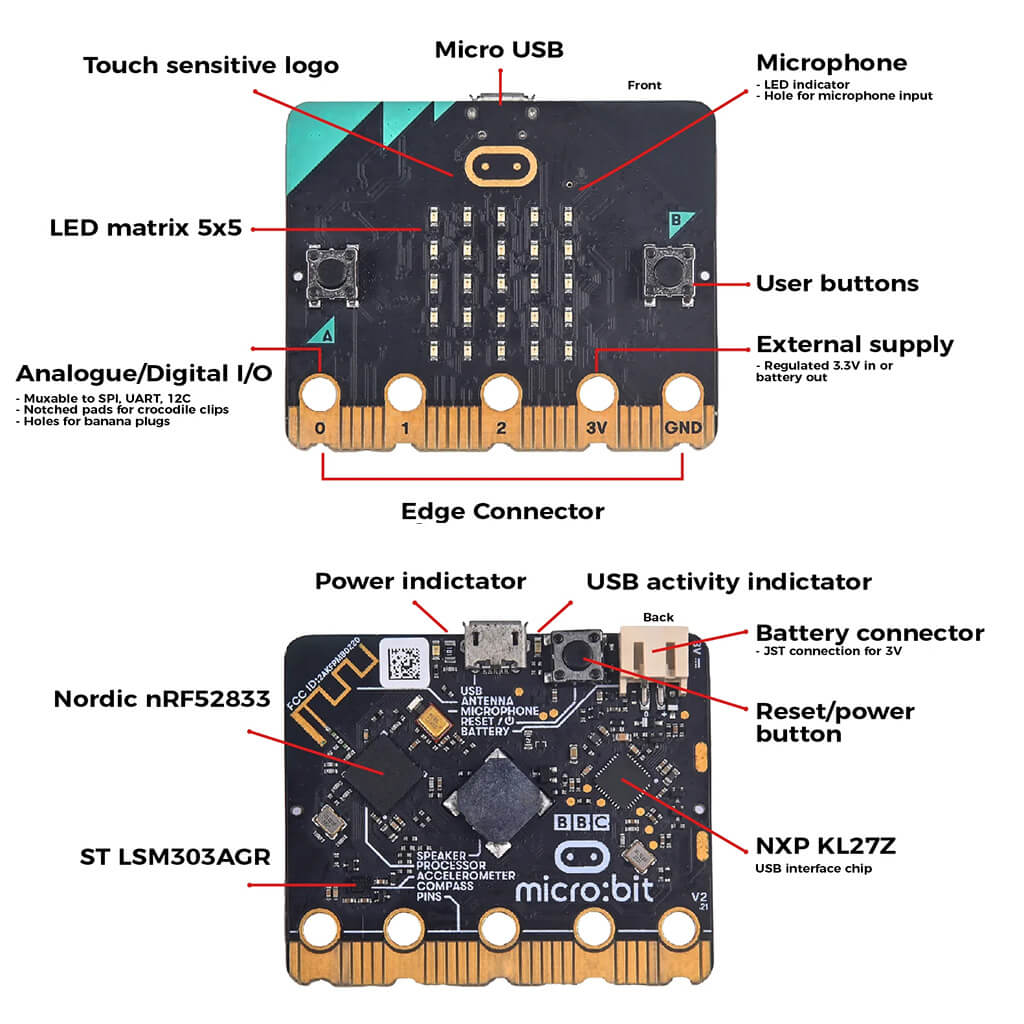
The micro:bit is packed with sensors and features. Let's look at the key specs of the latest version (V2):
- LED Display: It features 25 red LEDs (5x5) that can be programmed to show messages, numbers, or images.
- Buttons (A & B): Two programmable buttons to play games or control music.
- Motion Sensors: Includes an accelerometer (detects movement) and a compass (knows which way it's facing).
- Sound (New in V2): Built-in speaker and microphone, allowing the micro:bit to react to sounds or play melodies without external headphones!
- Touch Sensor (Logo): The logo on the front now acts as a touch button.
- Wireless Communication: Via Bluetooth and Radio, micro:bits can "talk" to each other, sending messages.
How to Code it? (Software)
The biggest advantage of the micro:bit is its ease of use. There are two main ways to program it:
1. Microsoft MakeCode (For Beginners)
Ideal for younger ages. It uses colorful "blocks" (drag-and-drop). You connect commands and see the result instantly on the simulator.
Try the Microsoft MakeCode Editor here
2. Python (For Advanced Users)
For students who want to go deeper, micro:bit supports MicroPython, a real text-based coding language used professionally.

Why choose micro:bit for STEM Education?
- Instant Gratification: The student writes code and immediately sees the LEDs light up.
- Low Cost: One of the most affordable robotics solutions on the market.
- Creativity: It can become a step counter, a robot, a musical instrument, and much more.
Which version suits your needs?
At antoniadis.com.cy, we stock all versions to cover every need, from the hobbyist to the classroom.
1. The Basics: BBC micro:bit V2 - Single Board

Ideal if you already have cables and battery holders. Includes the micro-computer board only.
2. The Best Start: BBC micro:bit V2 - Go Bundle

The ultimate microbit starter kit. Includes the micro:bit, USB cable, battery holder, and batteries. Ready to use out of the box!
3. For Classrooms: BBC micro:bit V2 - Club Box (10 set)

The perfect solution for schools and tuition centers. Contains 10 full sets in a convenient package.
Start your coding journey today!
At Antoniadis Electronics Educational Ltd, we are here to support your every step in educational robotics.
Ready to create?
View all BBC micro:bit products in our E-shop
Share